Scaling NestJS Applications with Microservices and RabbitMQ
2025-08-05 • 15 min read
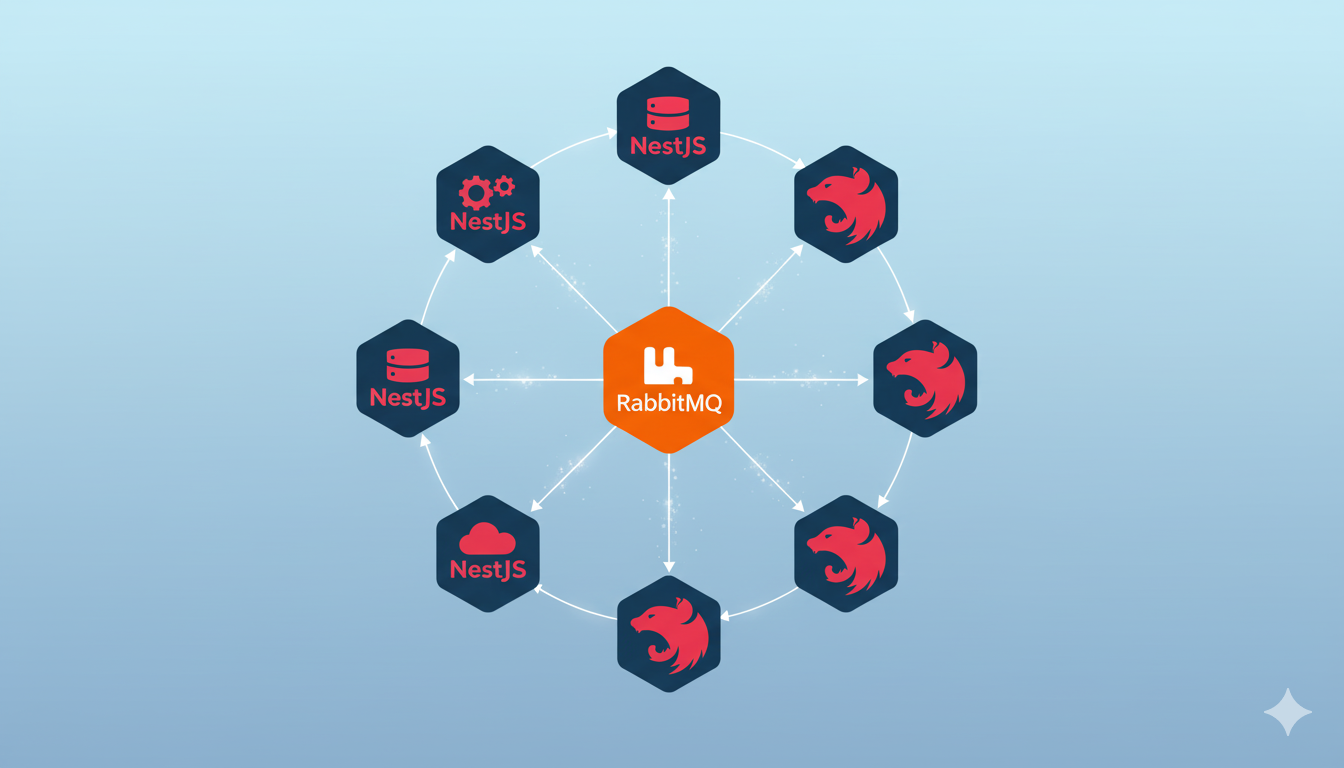
Modern web applications face increasing demands for scalability, maintainability, and performance. As monolithic architectures reach their limits, many development teams turn to microservices to address these challenges. NestJS, with its modular architecture and built-in support for microservices, provides an excellent foundation for building distributed systems. When combined with RabbitMQ as a message broker, you can create highly scalable and resilient applications.
Understanding the Architecture
Why Microservices?
Microservices architecture breaks down a large application into smaller, independent services that communicate over well-defined APIs. This approach offers several advantages:
- Independent deployment - Services can be deployed and scaled independently
- Technology diversity - Different services can use different technologies
- Fault isolation - Failures in one service don't necessarily bring down the entire system
- Team autonomy - Different teams can work on different services
- Better resource utilization - Scale only the services that need it
The Role of RabbitMQ
RabbitMQ serves as a message broker that enables asynchronous communication between microservices. It provides:
- Reliable message delivery with acknowledgments and persistence
- Flexible routing through exchanges and queues
- Load balancing across multiple consumers
- Dead letter queues for handling failed messages
- High availability through clustering
Setting Up the Foundation
Project Structure
tsxproject-root/ ├── apps/ │ ├── api-gateway/ │ ├── user-service/ │ ├── order-service/ │ └── notification-service/ ├── libs/ │ ├── common/ │ └── shared/ ├── docker-compose.yml └── package.json
Installing Dependencies
bashnpm install @nestjs/microservices amqplib amqp-connection-manager npm install --save-dev @types/amqplib
Docker Compose Configuration
Create a docker-compose.yml file for local development:
yamlversion: "3.8" services: rabbitmq: image: rabbitmq:3-management ports: - "5672:5672" - "15672:15672" environment: RABBITMQ_DEFAULT_USER: admin RABBITMQ_DEFAULT_PASS: password volumes: - rabbitmq_data:/var/lib/rabbitmq volumes: rabbitmq_data:
Building the API Gateway
The API Gateway serves as the single entry point for client requests and routes them to appropriate microservices.
Gateway Implementation
typescript// apps/api-gateway/src/main.ts import { NestFactory } from "@nestjs/core"; import { AppModule } from "./app.module"; async function bootstrap() { const app = await NestFactory.create(AppModule); app.setGlobalPrefix("api/v1"); await app.listen(3000); } bootstrap();
typescript// apps/api-gateway/src/app.module.ts import { Module } from "@nestjs/common"; import { ClientsModule, Transport } from "@nestjs/microservices"; import { UserController } from "./controllers/user.controller"; import { OrderController } from "./controllers/order.controller"; @Module({ imports: [ ClientsModule.register([ { name: "USER_SERVICE", transport: Transport.RMQ, options: { urls: ["amqp://admin:password@localhost:5672"], queue: "user_queue", queueOptions: { durable: false, }, }, }, { name: "ORDER_SERVICE", transport: Transport.RMQ, options: { urls: ["amqp://admin:password@localhost:5672"], queue: "order_queue", queueOptions: { durable: false, }, }, }, ]), ], controllers: [UserController, OrderController], }) export class AppModule {}
Gateway Controllers
typescript// apps/api-gateway/src/controllers/user.controller.ts import { Controller, Get, Post, Body, Param, Inject } from "@nestjs/common"; import { ClientProxy } from "@nestjs/microservices"; import { Observable } from "rxjs"; @Controller("users") export class UserController { constructor( @Inject("USER_SERVICE") private readonly userService: ClientProxy ) {} @Get() findAll(): Observable<any[]> { return this.userService.send({ cmd: "get_users" }, {}); } @Get(":id") findOne(@Param("id") id: string): Observable<any> { return this.userService.send({ cmd: "get_user" }, { id }); } @Post() create(@Body() userData: any): Observable<any> { return this.userService.send({ cmd: "create_user" }, userData); } }
Implementing Microservices
User Service
typescript// apps/user-service/src/main.ts import { NestFactory } from "@nestjs/core"; import { Transport, MicroserviceOptions } from "@nestjs/microservices"; import { AppModule } from "./app.module"; async function bootstrap() { const app = await NestFactory.createMicroservice<MicroserviceOptions>( AppModule, { transport: Transport.RMQ, options: { urls: ["amqp://admin:password@localhost:5672"], queue: "user_queue", queueOptions: { durable: false, }, }, } ); await app.listen(); console.log("User microservice is listening"); } bootstrap();
typescript// apps/user-service/src/user.controller.ts import { Controller } from "@nestjs/common"; import { MessagePattern, Payload } from "@nestjs/microservices"; import { UserService } from "./user.service"; @Controller() export class UserController { constructor(private readonly userService: UserService) {} @MessagePattern({ cmd: "get_users" }) async getUsers() { return this.userService.findAll(); } @MessagePattern({ cmd: "get_user" }) async getUser(@Payload() data: { id: string }) { return this.userService.findById(data.id); } @MessagePattern({ cmd: "create_user" }) async createUser(@Payload() userData: any) { return this.userService.create(userData); } }
Order Service with Event Publishing
typescript// apps/order-service/src/order.controller.ts import { Controller, Inject } from "@nestjs/common"; import { MessagePattern, Payload, ClientProxy } from "@nestjs/microservices"; import { OrderService } from "./order.service"; @Controller() export class OrderController { constructor( private readonly orderService: OrderService, @Inject("NOTIFICATION_SERVICE") private readonly notificationService: ClientProxy ) {} @MessagePattern({ cmd: "create_order" }) async createOrder(@Payload() orderData: any) { const order = await this.orderService.create(orderData); // Emit event for order creation this.notificationService.emit("order.created", { orderId: order.id, userId: order.userId, amount: order.amount, }); return order; } @MessagePattern({ cmd: "get_orders" }) async getOrders(@Payload() data: { userId: string }) { return this.orderService.findByUserId(data.userId); } }
Advanced RabbitMQ Patterns
Event-Driven Communication
typescript// libs/common/src/events/base.event.ts export abstract class BaseEvent { abstract readonly eventType: string; readonly timestamp: Date = new Date(); readonly eventId: string = Math.random().toString(36); } export class OrderCreatedEvent extends BaseEvent { readonly eventType = "order.created"; constructor( public readonly orderId: string, public readonly userId: string, public readonly amount: number ) { super(); } }
Dead Letter Queue Implementation
typescript// apps/notification-service/src/notification.controller.ts import { Controller } from "@nestjs/common"; import { EventPattern, Payload, Ctx, RmqContext } from "@nestjs/microservices"; import { NotificationService } from "./notification.service"; @Controller() export class NotificationController { constructor(private readonly notificationService: NotificationService) {} @EventPattern("order.created") async handleOrderCreated(@Payload() data: any, @Ctx() context: RmqContext) { const channel = context.getChannelRef(); const originalMsg = context.getMessage(); try { await this.notificationService.sendOrderConfirmation(data); channel.ack(originalMsg); } catch (error) { console.error("Failed to send notification:", error); // Reject and requeue the message channel.nack(originalMsg, false, true); } } }
Queue Configuration with DLQ
typescript// apps/notification-service/src/main.ts import { NestFactory } from "@nestjs/core"; import { Transport, MicroserviceOptions } from "@nestjs/microservices"; import { AppModule } from "./app.module"; async function bootstrap() { const app = await NestFactory.createMicroservice<MicroserviceOptions>( AppModule, { transport: Transport.RMQ, options: { urls: ["amqp://admin:password@localhost:5672"], queue: "notification_queue", queueOptions: { durable: true, arguments: { "x-dead-letter-exchange": "dlx", "x-dead-letter-routing-key": "failed", "x-message-ttl": 60000, }, }, }, } ); await app.listen(); console.log("Notification microservice is listening"); } bootstrap();
Monitoring and Health Checks
Health Check Implementation
typescript// libs/common/src/health/rabbitmq-health.indicator.ts import { Injectable } from "@nestjs/common"; import { HealthIndicator, HealthIndicatorResult, HealthCheckError, } from "@nestjs/terminus"; import { ClientProxy } from "@nestjs/microservices"; import { timeout, catchError } from "rxjs/operators"; import { of } from "rxjs"; @Injectable() export class RabbitMQHealthIndicator extends HealthIndicator { constructor(private readonly client: ClientProxy) { super(); } async isHealthy(key: string): Promise<HealthIndicatorResult> { try { const result = await this.client .send({ cmd: "health_check" }, {}) .pipe( timeout(5000), catchError(() => of(null)) ) .toPromise(); const isHealthy = result !== null; const healthResult = this.getStatus(key, isHealthy); if (isHealthy) { return healthResult; } throw new HealthCheckError("RabbitMQ check failed", healthResult); } catch (error) { throw new HealthCheckError("RabbitMQ check failed", { [key]: { status: "down", message: error.message, }, }); } } }
Metrics and Logging
typescript// libs/common/src/interceptors/logging.interceptor.ts import { Injectable, NestInterceptor, ExecutionContext, CallHandler, Logger, } from "@nestjs/common"; import { Observable } from "rxjs"; import { tap } from "rxjs/operators"; @Injectable() export class LoggingInterceptor implements NestInterceptor { private readonly logger = new Logger(LoggingInterceptor.name); intercept(context: ExecutionContext, next: CallHandler): Observable<any> { const request = context.switchToRpc().getData(); const pattern = context.switchToRpc().getContext(); const start = Date.now(); return next.handle().pipe( tap(() => { const duration = Date.now() - start; this.logger.log( `Pattern: ${JSON.stringify(pattern)} | Duration: ${duration}ms` ); }) ); } }
Testing Strategies
Unit Testing Microservices
typescript// apps/user-service/src/user.controller.spec.ts import { Test, TestingModule } from "@nestjs/testing"; import { UserController } from "./user.controller"; import { UserService } from "./user.service"; describe("UserController", () => { let controller: UserController; let service: UserService; beforeEach(async () => { const module: TestingModule = await Test.createTestingModule({ controllers: [UserController], providers: [ { provide: UserService, useValue: { findAll: jest.fn().mockResolvedValue([]), findById: jest.fn().mockResolvedValue({}), create: jest.fn().mockResolvedValue({}), }, }, ], }).compile(); controller = module.get<UserController>(UserController); service = module.get<UserService>(UserService); }); it("should return users", async () => { const result = await controller.getUsers(); expect(service.findAll).toHaveBeenCalled(); expect(result).toEqual([]); }); });
Integration Testing
typescript// test/integration/user-service.e2e-spec.ts import { Test, TestingModule } from "@nestjs/testing"; import { ClientsModule, Transport } from "@nestjs/microservices"; import { AppModule } from "../apps/api-gateway/src/app.module"; describe("User Service (e2e)", () => { let app; let client; beforeAll(async () => { const moduleFixture: TestingModule = await Test.createTestingModule({ imports: [AppModule], }).compile(); app = moduleFixture.createNestApplication(); client = app.get("USER_SERVICE"); await app.init(); }); it("should create a user", async () => { const userData = { name: "John Doe", email: "john@example.com" }; const result = await client .send({ cmd: "create_user" }, userData) .toPromise(); expect(result).toHaveProperty("id"); expect(result.name).toBe(userData.name); }); afterAll(async () => { await app.close(); }); });
Deployment and Production Considerations
Docker Configuration
dockerfile# apps/user-service/Dockerfile FROM node:16-alpine WORKDIR /app COPY package*.json ./ RUN npm ci --only=production COPY dist/apps/user-service ./ COPY dist/libs ./libs EXPOSE 3001 CMD ["node", "main.js"]
Kubernetes Deployment
yaml# k8s/user-service-deployment.yaml apiVersion: apps/v1 kind: Deployment metadata: name: user-service spec: replicas: 3 selector: matchLabels: app: user-service template: metadata: labels: app: user-service spec: containers: - name: user-service image: your-registry/user-service:latest env: - name: RABBITMQ_URL value: "amqp://rabbitmq-service:5672" resources: limits: memory: "512Mi" cpu: "500m" requests: memory: "256Mi" cpu: "250m"
Environment Configuration
typescript// libs/common/src/config/rabbitmq.config.ts import { registerAs } from "@nestjs/config"; export default registerAs("rabbitmq", () => ({ url: process.env.RABBITMQ_URL || "amqp://localhost:5672", queue: process.env.RABBITMQ_QUEUE, prefetchCount: parseInt(process.env.RABBITMQ_PREFETCH_COUNT) || 10, retries: parseInt(process.env.RABBITMQ_RETRIES) || 3, retryDelay: parseInt(process.env.RABBITMQ_RETRY_DELAY) || 5000, }));
Best Practices and Performance Optimization
Connection Management
typescript// libs/common/src/rabbitmq/connection.service.ts import { Injectable, OnModuleDestroy } from "@nestjs/common"; import * as amqp from "amqp-connection-manager"; @Injectable() export class RabbitMQConnectionService implements OnModuleDestroy { private connection: amqp.AmqpConnectionManager; async createConnection(urls: string[]) { this.connection = amqp.connect(urls, { heartbeatIntervalInSeconds: 30, reconnectTimeInSeconds: 30, }); this.connection.on("connect", () => { console.log("Connected to RabbitMQ"); }); this.connection.on("disconnect", (err) => { console.log("Disconnected from RabbitMQ:", err.message); }); return this.connection; } async onModuleDestroy() { if (this.connection) { await this.connection.close(); } } }
Message Serialization
typescript// libs/common/src/serializers/custom.serializer.ts import { Serializer } from "@nestjs/microservices"; import { Logger } from "@nestjs/common"; export class CustomSerializer implements Serializer { private readonly logger = new Logger(CustomSerializer.name); serialize(value: any) { try { return { pattern: value.pattern, data: JSON.stringify(value.data), timestamp: new Date().toISOString(), }; } catch (error) { this.logger.error("Serialization error:", error); throw error; } } }
Circuit Breaker Pattern
typescript// libs/common/src/circuit-breaker/circuit-breaker.service.ts import { Injectable } from "@nestjs/common"; enum CircuitState { CLOSED, OPEN, HALF_OPEN, } @Injectable() export class CircuitBreakerService { private state = CircuitState.CLOSED; private failureCount = 0; private lastFailureTime?: Date; private readonly failureThreshold = 5; private readonly timeout = 60000; // 60 seconds async call<T>(fn: () => Promise<T>): Promise<T> { if (this.state === CircuitState.OPEN) { if (Date.now() - this.lastFailureTime.getTime() > this.timeout) { this.state = CircuitState.HALF_OPEN; } else { throw new Error("Circuit breaker is OPEN"); } } try { const result = await fn(); this.onSuccess(); return result; } catch (error) { this.onFailure(); throw error; } } private onSuccess() { this.failureCount = 0; this.state = CircuitState.CLOSED; } private onFailure() { this.failureCount++; this.lastFailureTime = new Date(); if (this.failureCount >= this.failureThreshold) { this.state = CircuitState.OPEN; } } }
Conclusion
Scaling NestJS applications with microservices and RabbitMQ provides a robust foundation for building distributed systems. The combination offers excellent developer experience while maintaining production-ready features like reliability, scalability, and maintainability.
Key takeaways for successful implementation:
- Start simple - Begin with a few services and gradually decompose as needed
- Design for failure - Implement proper error handling, retries, and circuit breakers
- Monitor everything - Use comprehensive logging, metrics, and health checks
- Test thoroughly - Implement both unit and integration tests
- Plan for deployment - Use containerization and orchestration tools
The architecture patterns and code examples provided in this article serve as a foundation that you can adapt to your specific requirements. Remember that microservices introduce complexity, so ensure your team is prepared to handle distributed system challenges like service discovery, data consistency, and network latency.
With proper planning and implementation, this architecture can scale to handle millions of requests while maintaining code quality and system reliability.